Quickly publish SHP data as MVT vector tile services
Free on-premise cesium ion alternative
MVT is a cornerstone of modern web mapping technology, serving as a specification for efficiently transmitting vector map data. The acronym MVT stands for Mapbox Vector Tile, an open standard primarily developed by Mapbox.
This article explores how to use GISBox software to import SHP files (a vector format) and publish them using the MVT protocol.
What is SHP Data?
SHP (Shapefile) is the “universal language” of the GIS world. It is a vector data format that uses multiple associated files to store both the spatial information (location and shape) and attribute information of geographic features.
Why Use the MVT Protocol?
- Exceptional Performance: Data is divided into small tiles on-demand. Only the content currently in the viewport is loaded, minimizing data transfer and ensuring smooth, delay-free map zooming.
- Ultimate Styling Flexibility: Map styles (colors, fonts, etc.) are completely separate from the data. This allows real-time switching of themes (e.g., day/night mode) directly in the client without regenerating the data, enabling “one dataset, multiple maps.”
- Powerful Interactivity and High-Definition Rendering: Supports feature-level interactions like hovering and click-to-query. As vector graphics, the maps are infinitely scalable without loss of clarity, perfectly adapting to high-definition screens.
Publishing Vector Services with GISBox
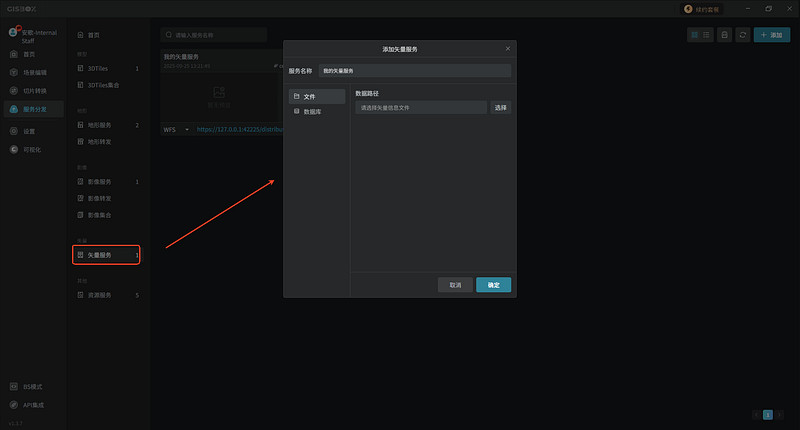
GISBox’s built-in free GIS server supports importing vector data for publishing. Click on “Vector Services” and add your local SHP file.
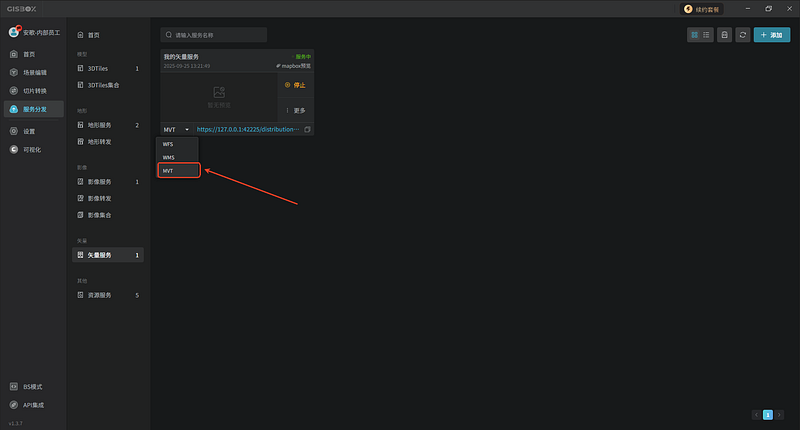
After adding the file, the new service will appear in the Vector Services list. Select the MVT protocol here for publishing.
GISBox Official Teams: https://teams.live.com/l/invite/FEAr12sInvEVy4hFQE
Official Teams Group: https://teams.live.com/l/invite/FBAFp0pbqhqlpe1BQI
Contact us to get 7-day Team Plan


评论
发表评论